
Continuously synchronize SharePoint to SQL Server
Make SharePoint data fast, queryable, and reliable for Power BI, reporting, and integrations.
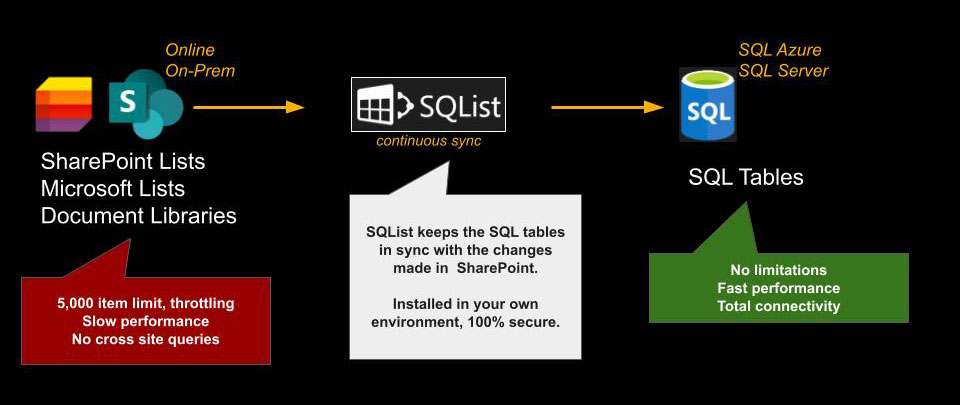
SQList continuously synchronizes SharePoint data to SQL Server, so you can query large lists, combine data from multiple sites, and build reliable reports without SharePoint limitations.
What SQList does
Replicates SharePoint lists to SQL Server
Automatically copies list data into SQL tables so your reporting and integrations run on a fast, query-friendly database.
Keeps data up to date
Runs continuous replication to keep SQL aligned with SharePoint, supporting near-real-time reporting patterns where needed.
Enables clean reporting models
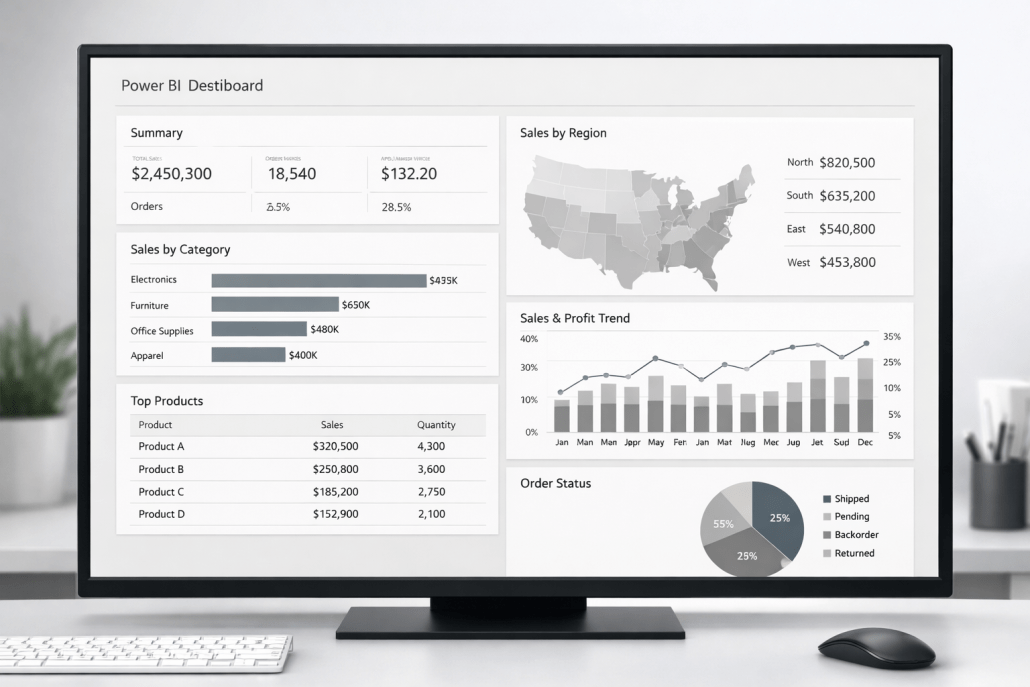
Build SQL views and a stable semantic layer for Power BI (including DirectQuery where appropriate), without fragile point-to-point connections to SharePoint.
At a glance
- Supports SharePoint Online and SharePoint On-Premises
- Handles very large lists (millions of items, hundreds of columns)
- Automatically handles SharePoint limitations such as throttling, list view thresholds, and column limits
- Consolidates data from multiple SharePoint sites into a single SQL Server database for a unified, holistic view
- Automatically generates SQL tables and columns and keeps database structures in sync with SharePoint
- Flexible list selection: individual lists, all lists with exclusions, or lists by name across site collections
- Extremely lightweight, with no noticeable load on SharePoint or SQL Server
- Runs entirely within your environment, with security fully under your control
- Plug & play: data available in SQL Server within minutes
- No changes required to SharePoint: no agents, add-ins, or installations
- Works in on-premises and cloud environments
- Generates a fully normalised SQL schema for maximum flexibility in querying and reporting
- Supports all complex SharePoint column types, including multi-lookup fields (many-to-many tables created automatically)
When SharePoint becomes the bottleneck
Do any of these sound familiar?
- Power BI refreshes struggle or fail on large SharePoint lists
- Reporting directly on SharePoint is slow and unreliable for users
- List view thresholds are reached sooner than expected
- Cross-site aggregation relies on manual, time-consuming processes
SharePoint lists are excellent for collaboration and operational tracking, but reporting and analytics start to break down as data grows and requirements become stricter.
- Power BI reports become slow, fragile, or require complex workarounds
- Large lists trigger throttling, view thresholds, and inconsistent performance
- Cross-site reporting becomes difficult to maintain
- Data quality rules and auditability are harder to implement purely in SharePoint
- Downstream systems need a stable SQL source rather than ad-hoc exports
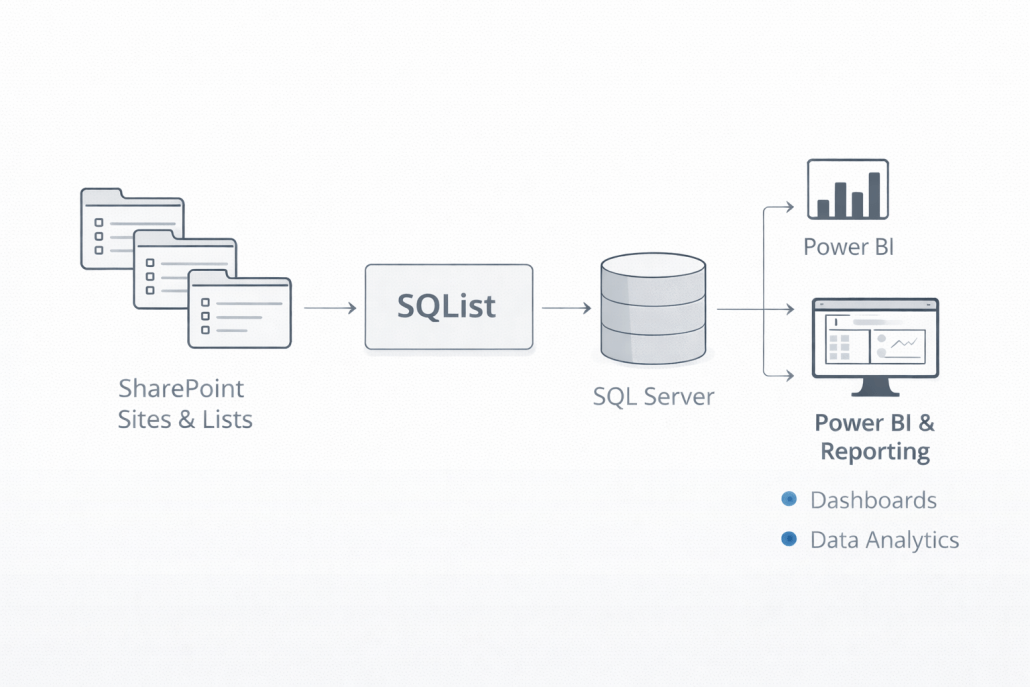
SQList is a pragmatic bridge: keep SharePoint for operations, and use SQL Server for analytics and integration.
Used where SharePoint data needs to be dependable
SQList is used across a range of data-intensive use cases, including pharmaceutical operations, oil and gas reporting, enterprise reporting platforms, and data-driven AI initiatives, where SharePoint lists hold real operational data and organisations require consistent reporting, faster analytics, and clean downstream integrations.




What Our Customers Say
“It is a wonderful tool. We use SQList to pull data to a workflow automation system… it helps us get the data back inside without fuss.”
Mark, PSD Programmer Analyst, Education
“It’s a mainstay product of ours and central to the strategy of using SPO as a data repository for PowerPlatform, as opposed to having to use premium connectors. AxioWorks has been a real problem solver for us over the years.”
Roger, Head of Digital Data & Technology, Fire and Rescue Service
“SQList! Great utility we have been using for years… and saved us countless hours over the years!”
Justin, Education/Research
“After some adaptations and limits removal by your team in SQList, we were able to migrate all our SharePoint lists to SQL sever including pdf reports.”
Gilbert, Medicines/Pharma
“AxioWorks works well and quickly.”
Ishaq, Government/Public Sector
“I was pleased with how easy the tool was to use. Data integrity seemed good and the tool worked quickly”
Scott, Senior Developer, Government/Public Safety
How it works
1. Connect to SharePoint
Configure the connection to the SharePoint site containing the lists youwant to export.
Both Online and On-prem SharePoint sites are supported.

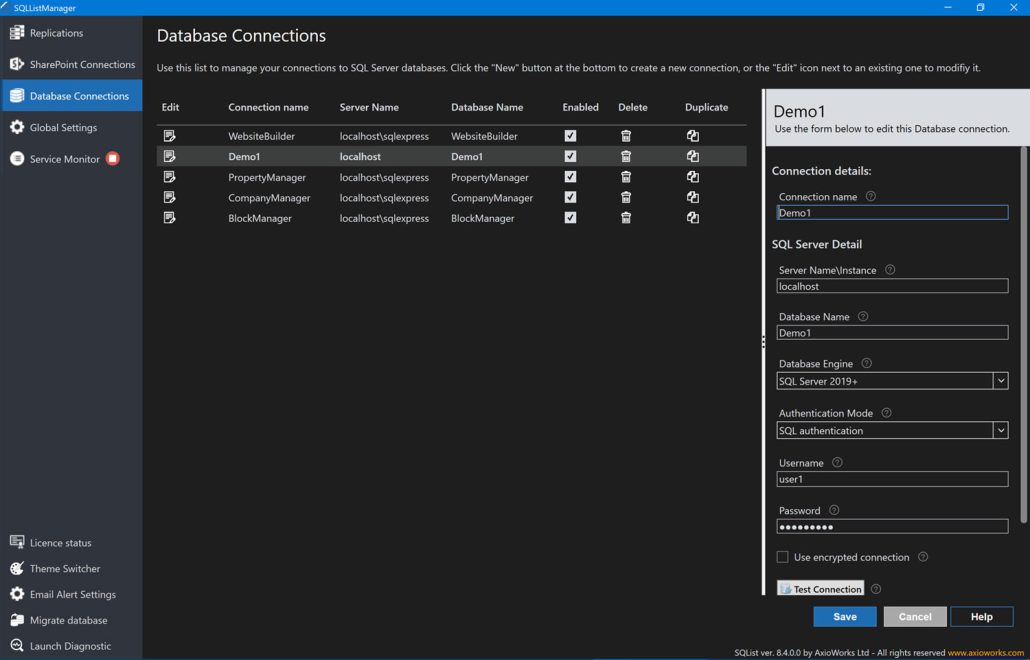
2. Connect to SQL Server
Configure the connection to the SQL Server database where you want to store the replicated data.
You don’t need to create tables or map columns; SQList will handle that for you.
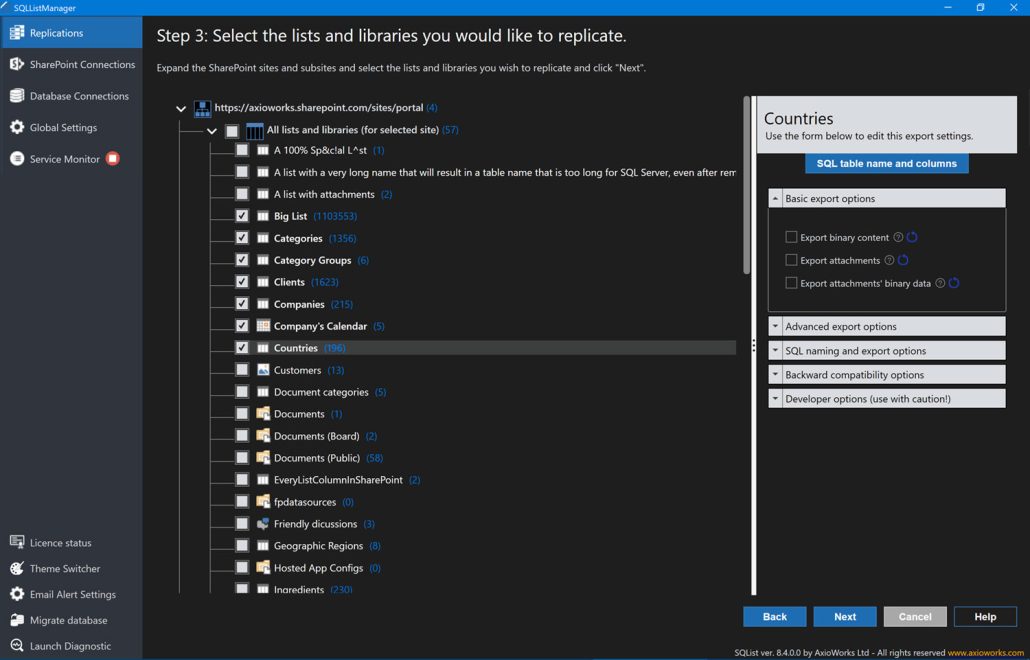
3. Select the Lists and Libraries to export
You can choose lists and libraries from any level of the hierarchy, allowing you to export lists from a site and its subsites in a single replication.
A wide selection of settings is available to configure the replacements, allowing you to export the data in the manner that best suits your requirements.
4. Run SQList!
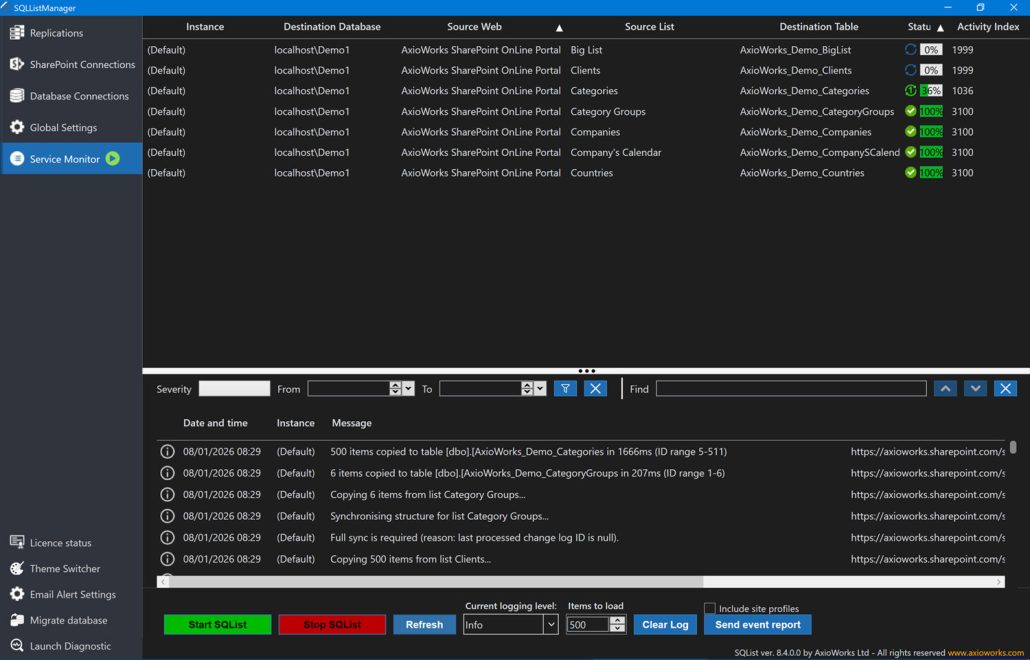
SQList runs as a Windows service in the background, continuously synchronising your SQL tables with their corresponding SharePoint lists and libraries.
It automatically manages SharePoint limitations such as item list limits, throttling, and lookup columns, so you won’t have to worry about them.
It is very lightweight, ensuring that no pressure is placed on the SharePoint sites. Under normal circumstances, the replication times are typically within seconds from when a change is made in SharePoint to when the data is synchronised with the SQL table.
5. Merge data from different SharePoint sites into one database
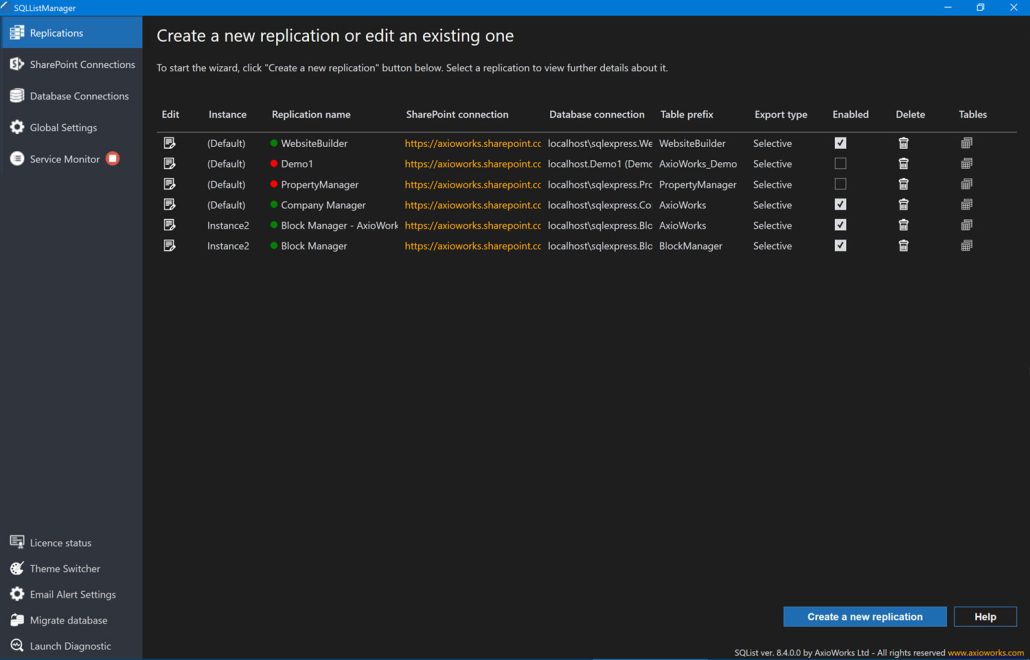
You can create multiple replications from different SharePoint sites, including a mix of Online and On-Premises, to the same SQL Server database. This allows you to query and join all that data as a single database.
You can create views on top of the tables to handle complex joins and then use them as a source for Power BI reports in Direct Query mode, ensuring fast and efficient reporting on live SharePoint data.
Designed for control, auditability, and sensible security review
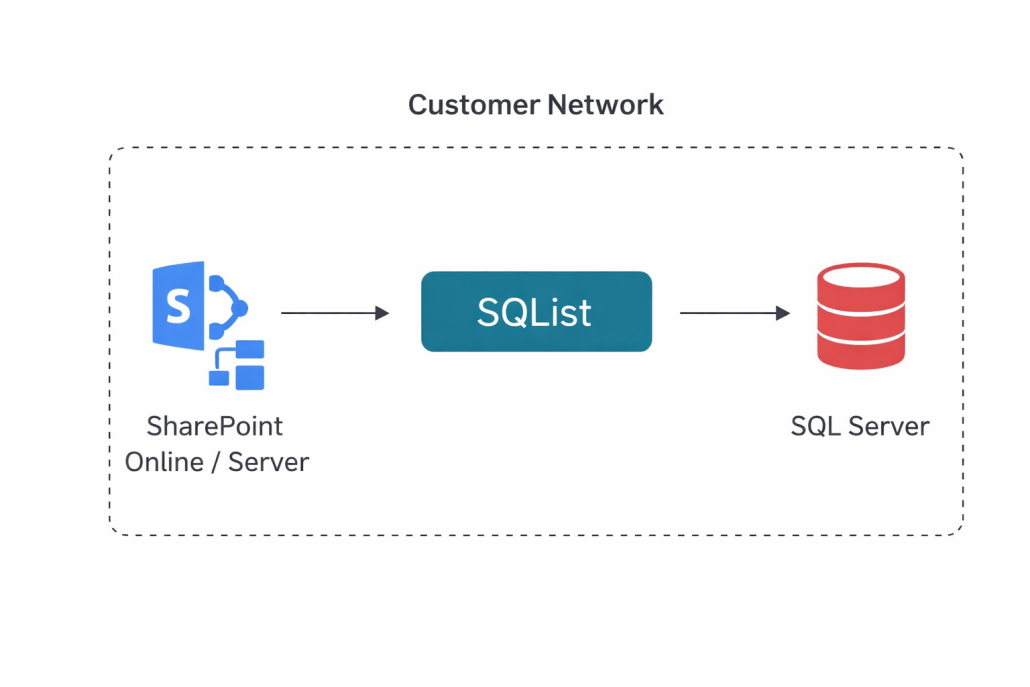
SQList is deployed within your infrastructure. You control connectivity, credentials, and network access. The data flow is explicit: SharePoint as the source, SQL Server as the target, under your policies.
Runs in your environment
You control connectivity, credentials, and network access.
Reviewable data handling
The replication process is straightforward and easy to describe in a security review.
Common use cases
Power BI at scale on SharePoint data
Avoid slow refreshes and brittle connectors by reporting from SQL tables and curated views.
Cross-site reporting
Consolidate multiple SharePoint sites and lists into a consistent SQL model for organisation-wide reporting.
Operational analytics and auditing
Avoid slow refreshes and brittle connectors by reporting from SQL tables and curated views.
Integration with downstream systems
Provide a stable SQL interface for other applications without building fragile custom APIs around SharePoint.
Large lists and long retention
Shift heavy querying and long-term analytics workloads to SQL Server while SharePoint remains the system of record.
Pragmatic modernisation
Create a bridge for teams that want progress now without a risky data platform migration project.
Key capabilities
- SharePoint Online and On-prem support for modern and legacy platforms
- Large list handling for reporting-focused replication patterns
- Lookup-aware modelling to keep relational structures meaningful in SQL
- Multi-site consolidation for central and regional site architectures
- SQL-first outputs enabling views, stored procedures, and BI semantic layers
- Predictable operations with clear configuration and repeatable jobs
What teams typically achieve
Faster, more stable reporting
SQL-backed models are easier to optimise and maintain than direct SharePoint reporting pipelines.
Lower operational friction
Reduce time spent on workarounds, refresh failures, and troubleshooting SharePoint reporting limitations.
Cleaner data models
Use SQL to build a coherent reporting layer, with consistent definitions and simpler governance.
Simple evaluation and straightforward licensing
Start with a trial, validate performance on your real lists, then choose a licence that fits your usage.
Frequently asked questions
Is SQList for SMEs or enterprises?
Both. SQList is best for organisations that rely on SharePoint lists for operational data and need dependable reporting. It is particularly effective for organisations using SharePoint and Power BI who want results without a major migration project.
Do I need to change my SharePoint architecture?
No. SQList is designed to work with your existing sites and lists, providing a SQL reporting layer without forcing a redesign of your SharePoint solution.
Will this help with Power BI performance?
Most definitely. Moving reporting workloads to SQL Server allows you to model data properly, optimise queries, use Direct Query connections, and reduce reliance on SharePoint connectors for large-scale reporting.
Does SQList support SharePoint Online and on-premises? What about SQL Server and SQL Azure?
Yes, SQList supports both SharePoint Online and on-premises, as well as SQL Server on-premises and SQL Azure. In fact, replications can be performed using a mix of these for complete access to both modern and legacy sites as a unified database.
What is the typical setup effort?
In most instances, a proof of value can be completed swiftly, often in just a few minutes: connect a representative set of lists, replicate to SQL, and build a first Power BI model. Full rollout depends on list complexity, data volume, and governance requirements.