If your organisation uses SharePoint to manage lists or document libraries — but you find it frustrating to build and refresh meaningful reports — there is a smarter, faster way. With SQList from AxioWorks, you can turn SharePoint data into fully synchronised SQL Server tables, enabling real-time analysis with Power BI (or any other BI tool). This article explains how SQList works and why it could be the key to better, faster business insights.
Why SharePoint Lists Alone Are Not Enough
SharePoint provides a convenient way to store and manage data via lists and libraries. It is widely used for document management, task tracking, inventories and more. Power BI can connect directly to SharePoint lists — using “Get Data → SharePoint Online List” or “Integrate → Visualize in Power BI” — to generate quick reports.
Yet this approach has limitations. Large lists often suffer from performance issues or even time-outs. Integrations may struggle with complex relationships or metadata. Refreshing the reports can become slow or unreliable. And once list sizes grow, SharePoint’s built-in query capabilities can feel restrictive. These challenges make it hard to build robust, scalable reporting solutions purely on SharePoint.
How SQList Transforms SharePoint Data for Better Reporting
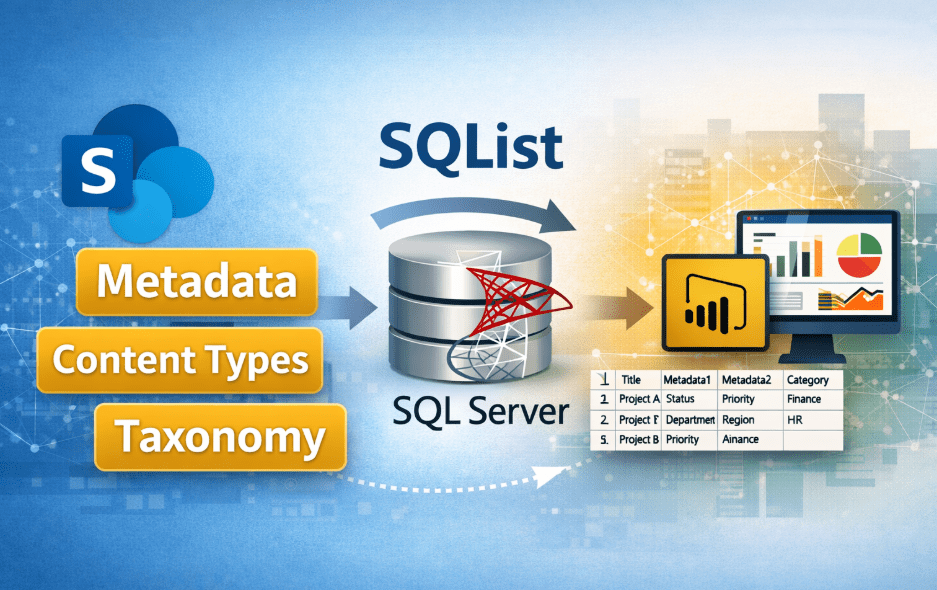
SQList acts as an efficient bridge between SharePoint and SQL Server. Installed on a Windows server or virtual machine, it regularly exports selected SharePoint lists and libraries into a SQL database — and then keeps that data synchronised.
Here are the key capabilities:
- Automatic export and sync: Once configured, SQList continuously monitors SharePoint and updates the SQL tables whenever items are added, edited or deleted.
- Dynamic table creation: The tool automatically creates and maintains a normalised structure — preserving lookup relationships, attachments, metadata, and hierarchies from SharePoint.
- Scalable performance: Because the data ends up in SQL Server, you avoid SharePoint’s list-view thresholds and performance bottlenecks. Even very large lists can be synchronised reliably.
- Flexibility and control: As the data resides within your own infrastructure (on-premise or cloud), you maintain full control over access, security and data governance. No modifications to SharePoint itself are required.
Building Power BI Reports from Live SharePoint Data
Once SQList has your SharePoint data mirrored into SQL Server, building reports becomes much more straightforward — and powerful. The typical workflow looks like this:
- Create or select a database in SQL Server for the replicated data.
- Use SQList Manager to connect to your SharePoint site and choose which lists or libraries you want to sync.
- Allow SQList to build the matching SQL tables and start synchronisation.
- Open Power BI Desktop (or connect via DirectQuery), link to the SQL database, and import the tables or views.
- Define relationships between tables (if your data spans multiple lists), just as you would in a typical relational database model.
- Create visualisations — charts, tables, dashboards — exactly as you would with any standard SQL data source. You can even build SQL views to simplify queries or speed up reporting.
Because the data in SQL stays synchronised with SharePoint in near real time, any change in your lists (e.g. a new entry, edit or deletion) will be reflected in your SQL tables — and thus will appear in your Power BI dashboards with minimal delay. Cancel the need for manual exports or cumbersome refreshes.
The Business Benefits — Why Teams Love SQList
There are clear advantages to using SQList for SharePoint-to-SQL replication:
- Speed and reliability: Reporting performance is significantly improved compared with querying SharePoint directly. Even large datasets behave smoothly.
- Rich insights: With SQL as the backbone, you can write more complex queries, aggregate data across lists, join disparate data sources, and build advanced analytics — all beyond the limitations of SharePoint.
- Seamless integration: Once in SQL, your data can feed into other systems — data warehouses, custom applications, line-of-business tools — without being tied to SharePoint.
- Real-time analytics: Thanks to continuous synchronisation, you can rely on live data rather than snapshots — perfect for dashboards, KPIs, or monitoring dashboards that need up-to-date information.
- Full control and security: As SQList runs within your own environment, you maintain access control, encryption and data governance. There’s no need to give external tools direct access to SharePoint or compromise on compliance.
Comparing SharePoint–Native Reports vs SQL-Backed Reporting
Using SharePoint lists directly in Power BI might seem straightforward at first — and in simple cases it can work. However, that simplicity comes at a cost. SharePoint-based reports often suffer from slow performance, difficulties with complex relationships, limitations on large lists, and restricted metadata handling.
By contrast, when you use SQList to export your data into SQL Server, you take full advantage of a relational database’s power. The data becomes more flexible, faster to query, and easier to combine or transform. You can leverage SQL views, scheduled refreshes, and robust relationships — all without altering your SharePoint setup.
Get Started — Try SQList for Free Today
If this sounds like the kind of flexibility and performance your business needs, then the good news is that getting started is simple. SQList is offered with a free trial, allowing you to test it with your own SharePoint and SQL Server environment before making any commitment.
Once installed and configured, you’ll be able to build Power BI reports or dashboards in minutes — based on current SharePoint data, with all the power of SQL. Explore complex relationships, query across lists, visualise trends and generate analytics with ease.
For organisations that rely heavily on SharePoint for everyday workflows, but need the power and speed of SQL-backed data analysis — SQList provides a bridge that brings the best of both worlds. To experience it for yourself, download the trial or contact the team at AxioWorks via their website.
For a broader comparison of popular BI and reporting tools and guidance on using them with live SharePoint data, see Popular BI and reporting tools — strengths, weaknesses and using them with live SharePoint data.
Read more about when DirectQuery is the better choice for Power BI reports: Why DirectQuery is often the better choice for Power BI reports.
Conclusion
In a modern workplace where data-driven decisions matter, having timely and reliable insights can make all the difference. By turning SharePoint lists and libraries into synchronised SQL Server tables, SQList allows teams to use powerful BI tools — like Power BI — without being constrained by SharePoint’s limitations. Faster reporting, better scalability, improved performance, and real-time data access are all within reach. We encourage you to try SQList, explore its capabilities, and see how it can transform your SharePoint data into actionable intelligence.