What SQList does
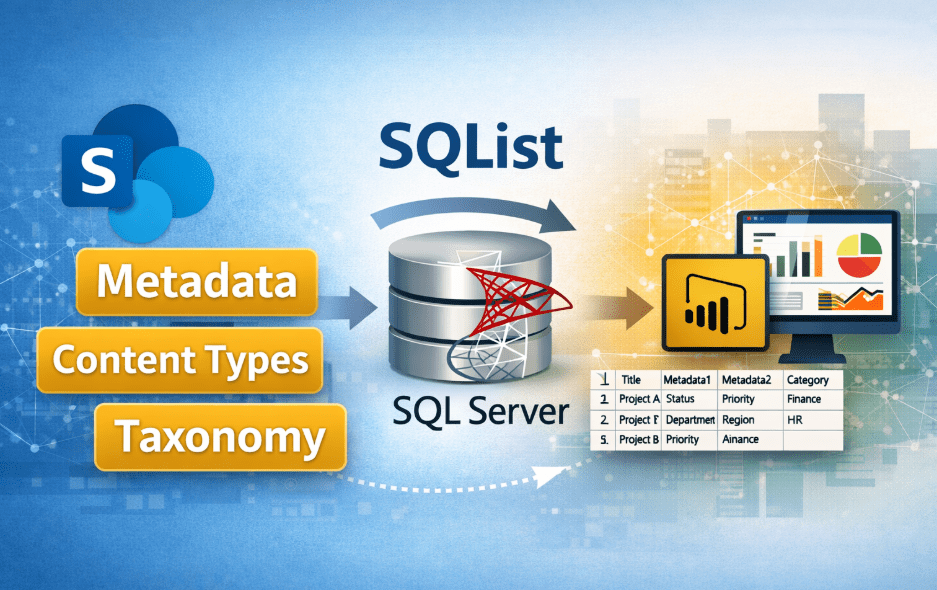
SQList from AxioWorks is a purpose-built solution that synchronises SharePoint list data with a SQL Server database. By creating a reliable, queryable representation of list content in SQL, SQList removes many of the limits and performance constraints that can hinder reporting, integration and large-scale data workflows on SharePoint.
This approach is particularly effective for organisations that want to unlock the value of their SharePoint data without re-engineering existing systems or introducing fragile custom code.
Why organisations move SharePoint list data into SQL
SharePoint lists are well suited for collaboration, workflows and structured data capture. However, they are not optimised for complex querying, large joins, or sustained analytical workloads. As usage grows, performance constraints and API limits can become a bottleneck.
By replicating list data into SQL Server, organisations gain access to a mature relational engine designed for querying, aggregation and integration. This architectural shift underpins many of the practical advantages of bringing SharePoint list data into SQL Server, especially in environments where reliability and predictability matter.
Core advantages for IT and business teams
- Faster queries and reporting. SQL Server is designed for ad-hoc queries, joins and aggregations. Moving SharePoint list data into SQL avoids the latency and restrictions of SharePoint REST/OData calls and enables tools such as SQL Server Reporting Services, Power BI and legacy BI systems to run efficiently against up-to-date list data.
- Simpler integration with other systems. Most line-of-business applications, ETL tools and middleware work natively with SQL Server. With list data available in SQL, integrations become straightforward: you can join list content with CRM, ERP or transactional data without complex API code.
- Handles scale and thresholds. SharePoint list thresholds and API throttling can make large queries unreliable. A SQL copy provides a stable surface for bulk operations, exports and downstream processing without repeatedly hitting SharePoint limits.
- Improved developer productivity. Developers can use familiar T-SQL, stored procedures and database tools instead of custom SharePoint code. That reduces development time and lowers the specialist SharePoint knowledge required to build integrations or reports.
- Operational flexibility. Once list data is in SQL, you can schedule ETL, archive older records, implement incremental transforms and maintain history with standard database techniques—capabilities that are harder to implement directly on SharePoint lists.
Practical examples of value
To make the advantages concrete, consider three common scenarios that frequently appear in real-world deployments:
- Reporting and dashboards. A finance team needs daily dashboards combining approvals from a SharePoint list with sales figures stored in SQL. With SQList feeding the list data into SQL Server, Power BI can build combined visuals without complex queries to SharePoint or data duplication scripts. This pattern aligns closely with live reporting scenarios using SharePoint and Power BI.
- System-to-system integration. An HR system requires nightly updates based on case records kept in SharePoint. Synchronised SQL tables let the HR integration job perform set-based updates directly against a relational source, simplifying error handling and retries. This is a common example of integrating SharePoint data with line-of-business systems.
- Bulk exports and migrations. For migrations off SharePoint or for long-term archival, an up-to-date SQL copy reduces the effort of extracting large volumes of list items and associated metadata using brittle REST calls.
Operational benefits and risk reduction
- Reduced load on SharePoint. Frequent reporting and heavy queries against lists can affect user experience. By serving those operations from SQL, organisations reduce stress on the SharePoint environment.
- Predictable performance. Database servers are easier to scale predictably for read-heavy workloads than SharePoint farms operating under API and threshold constraints.
- Better audit and retention options. Standard database tools simplify consistent backups, point-in-time restores and archive strategies for list data, which supports compliance and governance requirements.
How organisations typically adopt SQList
Adoption usually follows a practical, low-risk pattern that delivers value early:
- Identify high-value lists. Choose lists that are heavily used for reporting, integration or bulk processing.
- Synchronise to SQL. Use SQList to create a SQL representation of the list data and confirm that existing reports and data processes run against the database copy without impacting SharePoint performance.
- Iterate and extend. Expand synchronisation to additional lists, introduce transformations, or implement archival rules in the SQL environment.
This incremental approach mirrors the on-premises integration patterns many organisations already use, keeping disruption to a minimum.
Security and governance considerations
Moving data into SQL does not remove the need for sound governance. Role-based access controls, encryption at rest and in transit, and audit logging should be applied consistently to the SQL environment.
Because SQList runs inside the organisation’s infrastructure, these controls align naturally with existing security policies, an approach explored in more detail in why SQList is a secure choice for SharePoint–SQL replication.
Getting started and next steps
If you are evaluating ways to make SharePoint list data more useful for reporting and integration, SQList is worth investigating. The AxioWorks product page outlines the solution and provides details on capabilities and deployment considerations:
https://www.axioworks.com/products/axioworks-sqlist-standard/
For a detailed discussion of options and trade-offs when exporting SharePoint data to SQL Server, see the article Exporting SharePoint data to SQL Server: options, trade‑offs and when to choose each approach.
Related reading: Why finance and audit data should not live only in SaaS platforms.
For a practical guide on establishing a canonical reporting store from SharePoint, see Single Source of Truth: How to Build Reliable Reporting from SharePoint Data.
Start by listing the top three reporting or integration use cases where SharePoint is a bottleneck. For each case, estimate the expected improvement in developer effort, query latency and operational risk if the list data were available in SQL. That quick evaluation will usually show a clear return on investment and guide a phased rollout.
AxioWorks offers practical experience with SharePoint-to-SQL synchronisation projects and can help validate an approach that fits your environment and governance requirements.
#sharepoint #sqlserver #dataintegration #reporting #powerbi #businessintelligence